5 .
S M A R T
L I F E
A P
P
5.1 APP INSTALLATIO
N
Method A: search for “Smart Life” in the Google Play Store or the App Store t
o
download the app
.
Method B: use an iPhone or Android smartphone to scan the QR code and downloa
d
the app.
5.2 APP REGISTRATIO
N
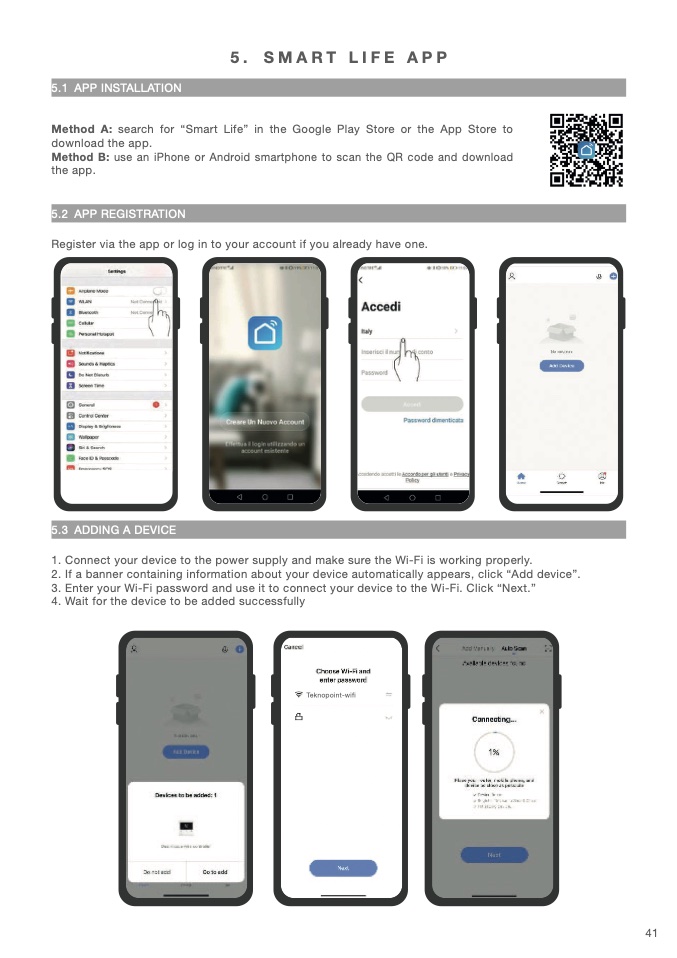
Register via the app or log in to your account if you already have one
.
5.3 ADDING A DEVICE
1. Connect your device to the power supply and make sure the Wi-Fi is working properly
.
2. If a banner containing information about your device automatically appears, click “Add device”.
3. Enter your Wi-Fi password and use it to connect your device to the Wi-Fi. Click “Next.
”
4. Wait for the device to be added successfull
y
Teknopoint-wifi
41

