4 .
4.1 CONTROL PANE
L
C O N T R O L
P A N E L
A N D
R E M O T E
C O N T R O L
No.
Description
No.
Descriptio
n
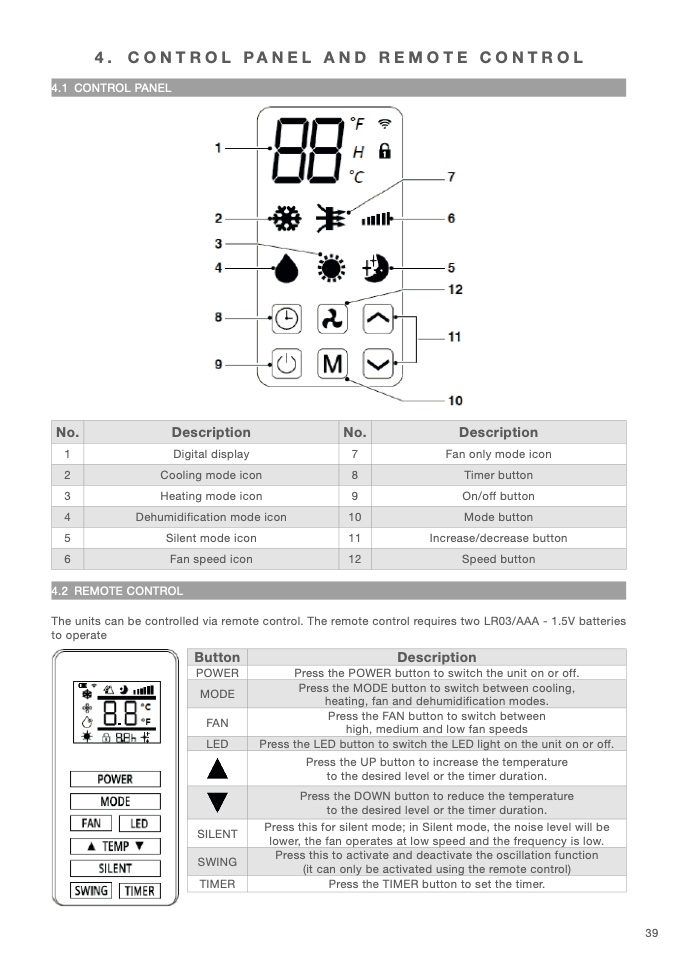
1
Digital display
7
Fan only mode ico
n
2
Cooling mode icon
8
Timer butto
n
3
Heating mode icon
9
On/off button
4
Dehumidification mode icon
10
Mode button
5
Silent mode icon
11
Increase/decrease button
12
Speed butto
n
6
Fan speed icon
4.2 REMOTE CONTRO
L
The units can be controlled via remote control. The remote control requires two LR03/AAA - 1.5V batteries
to operate
Button
Descriptio
n
POWER
Press the POWER button to switch the unit on or off.
MODE
Press the MODE button to switch between cooling,
heating, fan and dehumidification modes
.
FAN
Press the FAN button to switch betwee
n
high, medium and low fan speeds
LED
Press the LED button to switch the LED light on the unit on or off
.
Press the UP button to increase the temperature
to the desired level or the timer duration
.
Press the DOWN button to reduce the temperature
to the desired level or the timer duration
.
SILENT
Press this for silent mode; in Silent mode, the noise level will b
e
lower, the fan operates at low speed and the frequency is low
.
SWING
Press this to activate and deactivate the oscillation functio
n
(it can only be activated using the remote control
)
TIMER
Press the TIMER button to set the timer
.
39

